Insider Access
Build WordPress sites 81% faster with Tailwind; let clients edit visually
Say goodbye to the time-consuming, mouse-heavy workflow of drag-and-drop site builders.
Make Tailwind HTML code visually editable in WordPress. It's efficient, productive, and perfect for WordPress & Tailwind devs, agencies, and freelancers.
Deliver 20 additional client sites this year, with the same team size!
Up To
1.82x
faster vs. drag-and-drop
Save
8-16
hours per month per dev
ROI in
7
days, pays for itself!
Draft Layout
Editor
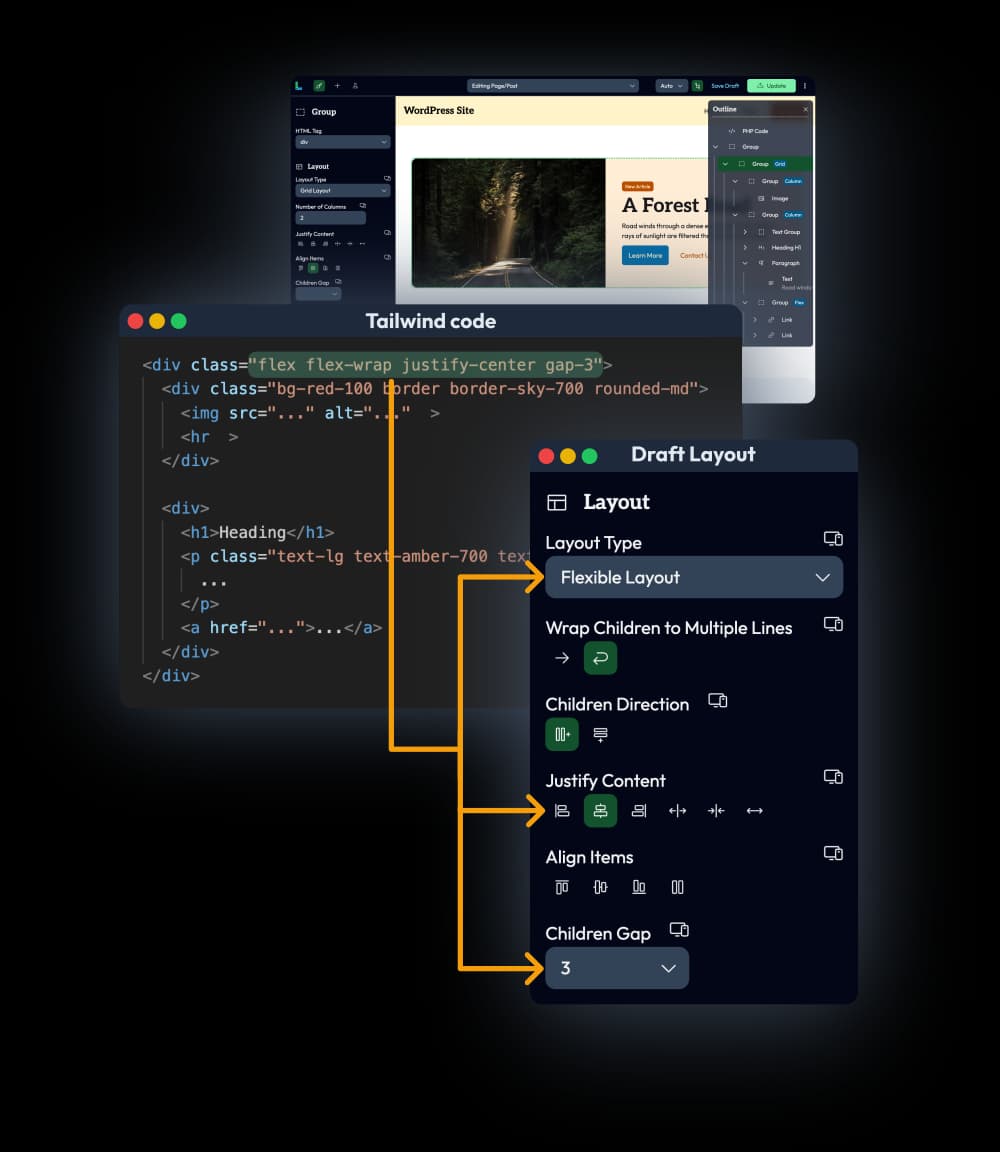
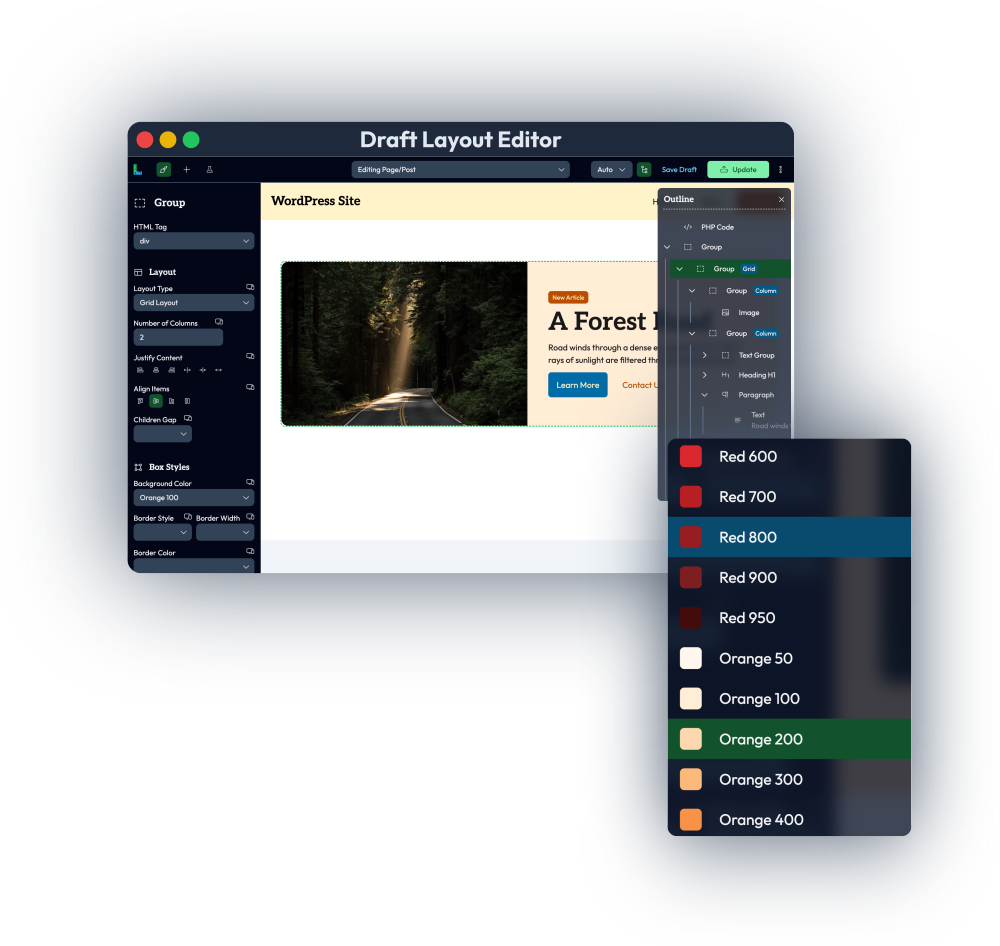
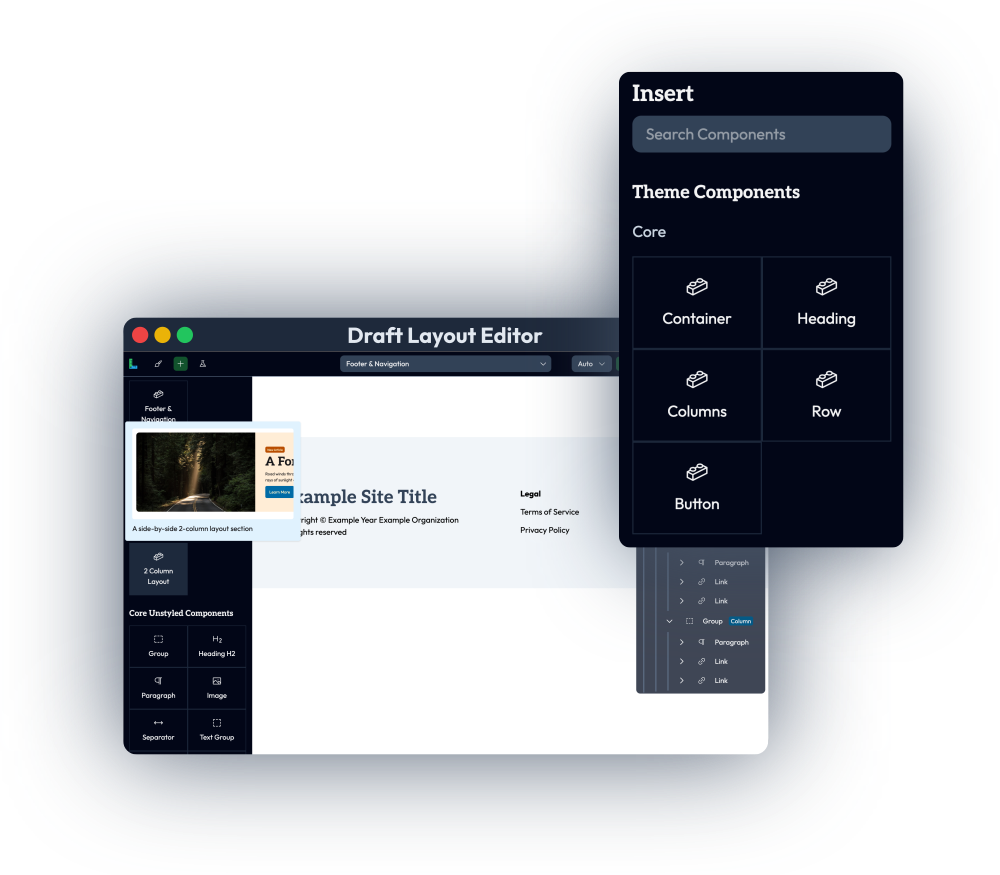
Make Tailwind HTML code visually editable in our intuitive and robust drag-and-drop Visual Editor. Best for devs/agencies who use a code editor or IDE to build WordPress themes with PHP and want maximum control and capabilities.
Draft Layout
Blocks
Make Tailwind HTML code visually editable inside WordPress's default Block/Gutenberg editor. Paste code directly inside the Block editor and continue to use other blocks/plugins as well.
Unlock raw-code productivity with client-friendly editability
Watch this 5-min demo to see how it works...
The Problem with Visual Editors
While drag/drop site builders are great for non-technical clients, they are painfully horrible for web agencies and developers
Endless clicking, dragging, and scrolling
Going through multiple steps, menus, and UI interactions just to change a simple property. And repetitive manual actions that can't be batched or automated.
Tedious & boring layout creation
Building responsive layouts from scratch is slow and frustrating. Fine-tuning sizes/spacing, alignment, and styles is finicky, imprecise, and clunky.
High overhead and maintenance costs
No efficient way to bulk edit, change, or fix multiple little things at once. Easy to unintentionally break fragile styles, and undo/redo is unreliable and clunky.
Poor efficiency & productivity for skilled devs
No multi-cursor editing, flexible copy/paste, keyboard shortcuts, and IDE plugins. Changes are tedious at scale without Regex find/replace and structural search.
Harder team collaboration & scaling
No Git diffs, rollbacks, pull request changes, or collaborative code reviews; devs can’t just “pull the repo” to see the code.
Dev speed throttled & bottlenecked by slow prototyping
Takes longer to iterate on new ideas, slows down rapid experimentation; can't "sketch" layouts quickly in code.
The Solution in 3 simple steps
Tailwind + WordPress = High-quality sites built fast, while Draft Layout makes your code easily editable in our drag-and-drop WP editor automatically
1
Set up
Use our Starter Theme to get started quickly, and customize it however you like.
2
Code
Use your favorite code editor or AI tool to write HTML/PHP code styled with Tailwind.
3
You're done!
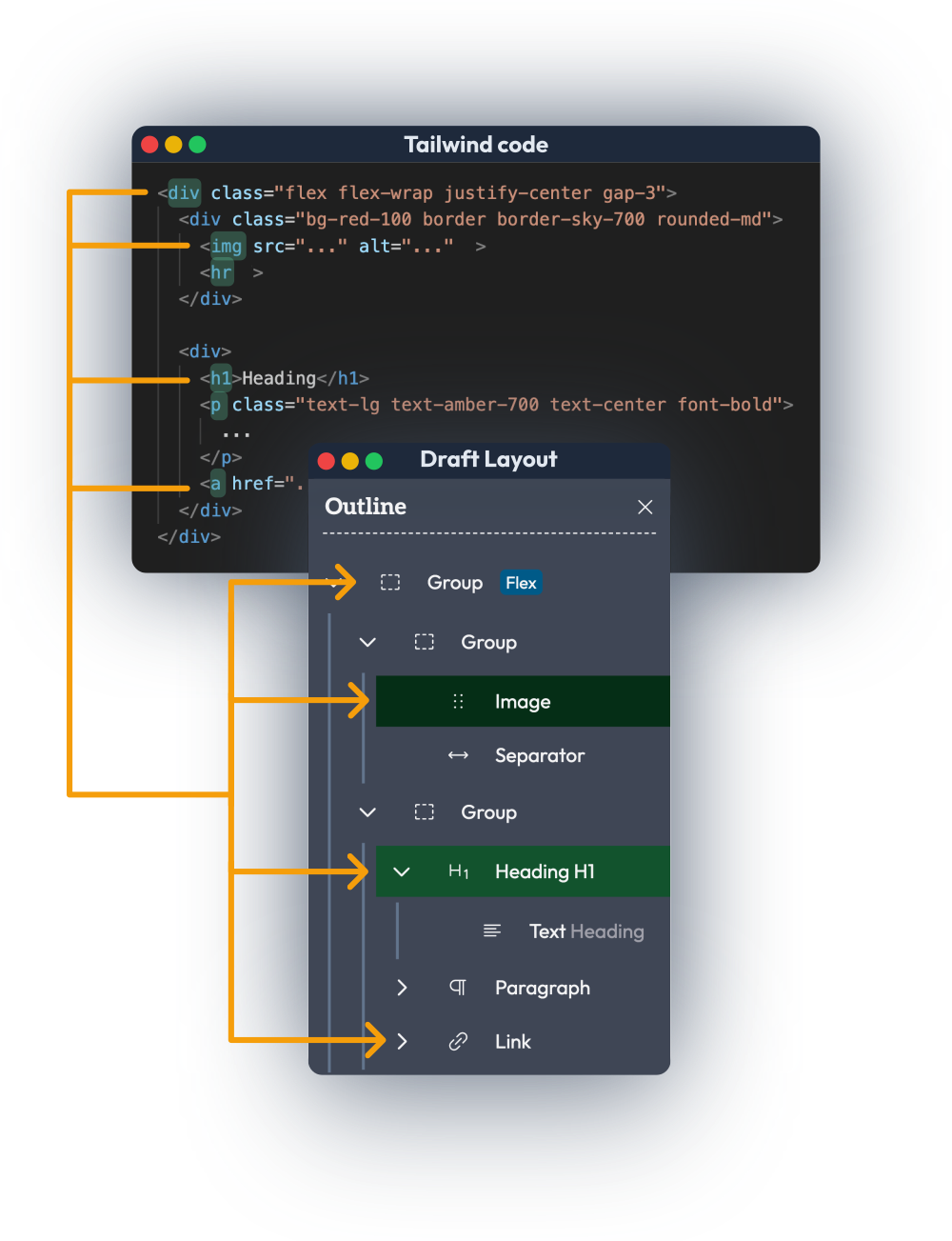
Draft Layout lets you preview your code and visually edit the HTML tags/classes easily.
Accelerate Productivity & Workflow Efficiency
Work faster in your favorite tools (VS Code, Emmet, Copilot).
Enjoy quick iteration and fun dev cycles; no more project timelines getting stretched forever.
Faster WordPress Website Delivery
Build pages and layouts in a fraction of the time it takes with visual builders.
Meet deadlines & deliver sites faster without sacrificing quality.
Higher Quality Output & Results
Start with clean, expressive, semantic HTML and tightly scoped Tailwind styles.
Full control over the code means peace of mind and fewer bugs.
Flexible, Scalable Maintenance
Easier updates (with Regex search/replace and power editing) and fewer bug-fixes.
Refactor once and apply globally across sections or templates.
Spend less time hunting down which widget or tab to click — just edit the code and speed everything up.
Agency Collaboration & Source Control
Version control with Git: track changes, review diffs, and collaborate like a pro.
Work in teams without worrying about breaking layouts.
Higher Margins, Growth, and ROI
Spend less time per project, serve more clients, and get higher profit margins:
Scale your agency or freelance business without hiring more devs or burning out
Say yes to more clients and projects thanks to reduced dev time
Deliver client-friendly solutions while saving tons of time
Build entire WordPress sites in 3 weeks instead of 2 months
Watch a real-time speed test building the same layout 1.82x faster with code vs. drag-and-drop
Buy for your AgencyHighest performance
Lean and efficient, all HTML/CSS is pre-rendered and saved to the WP database's post_content.
Reusable components
React-like components (with props) keep code DRY and make site-wide global changes easy.
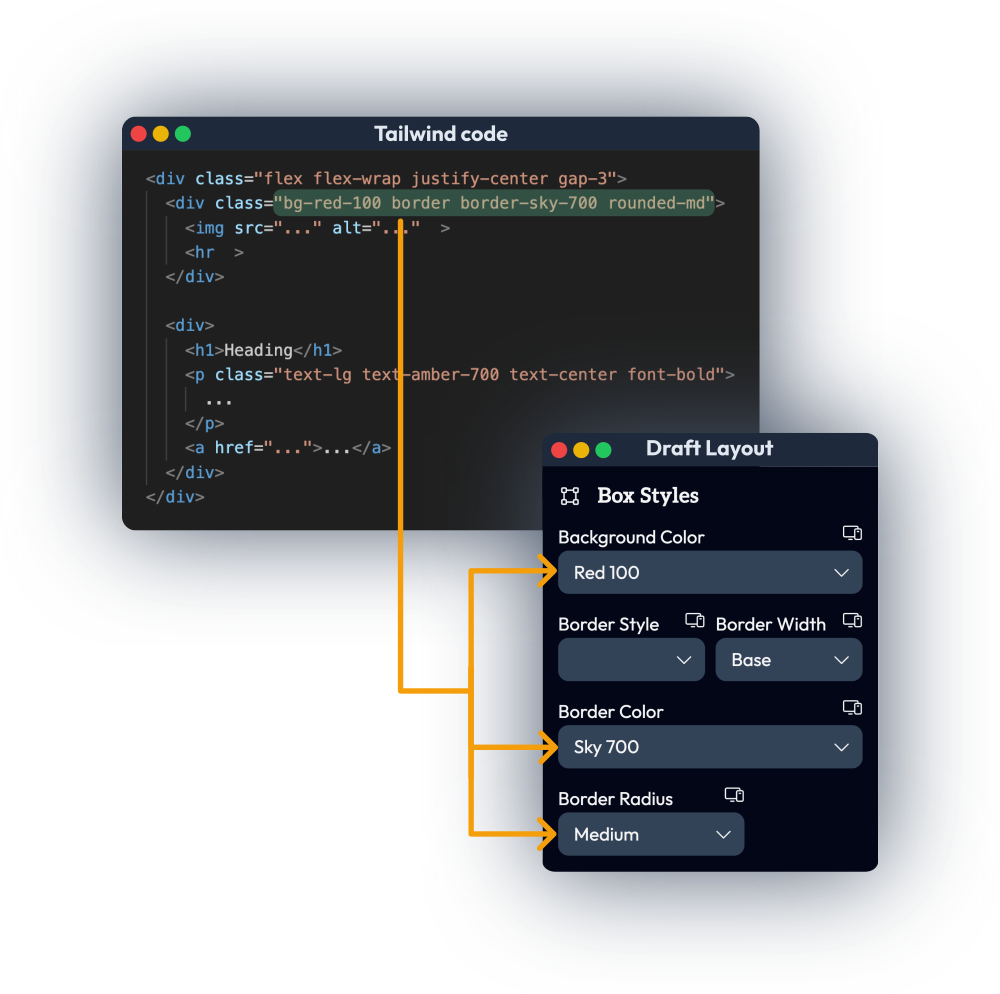
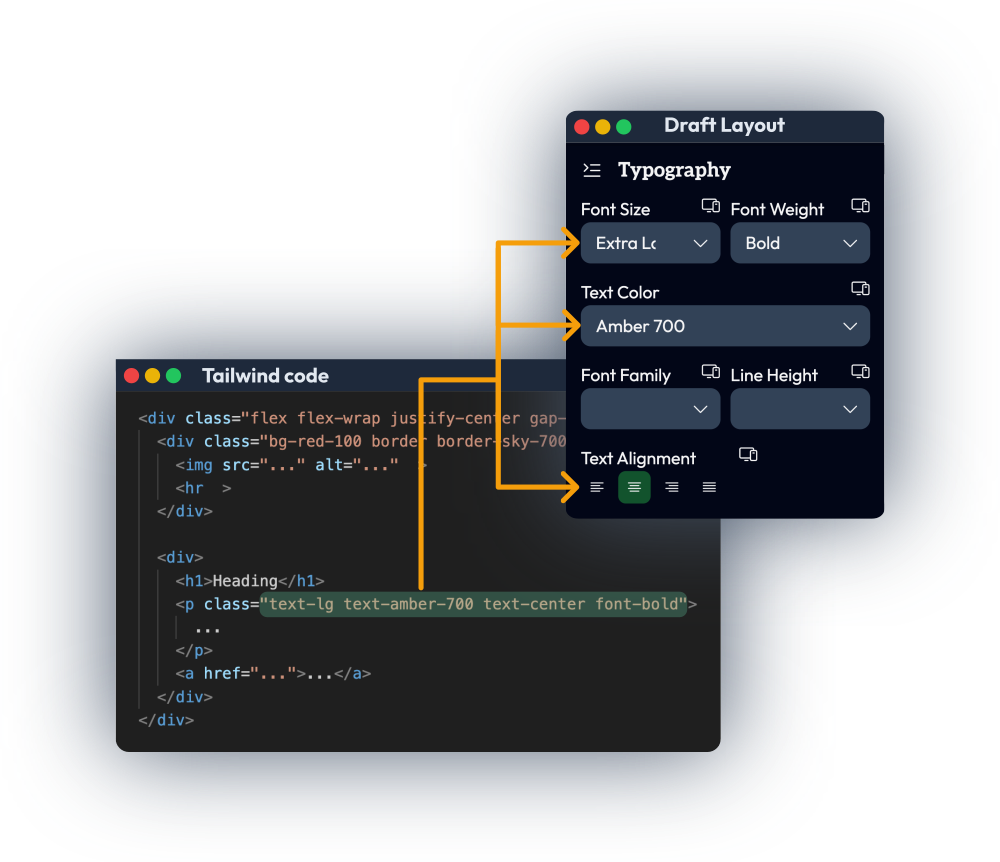
2-way change sync
Get changes made in our Visual Editor converted back to Tailwind code.
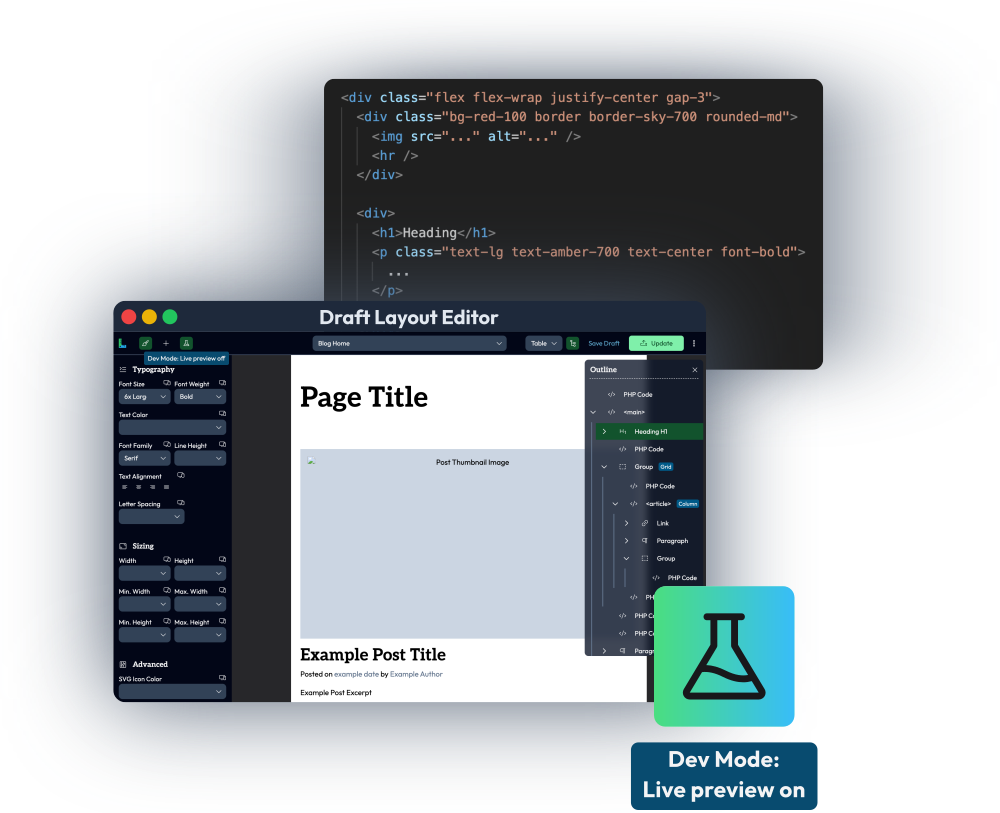
Live previews
Dev Mode watches your code to instantly hot-reload and render changes.
Full Tailwind power
Use complex spacing, breakpoints, and custom tokens without limitations.
Prototype freely
Build unconventional, precise designs and express creative ideas without compromise.
Benefits
No longer forced to choose between maintainability and visual editing.
Reusing blocks isn't difficult anymore; no need to drag/configure them every time.
Future-proof, portable, reusable: you own your code — no lock-in or vendor-specific proprietary formats.
Code once and use it across projects/clients, or even migrate to other platforms.
Built for high-growth digital agencies and developers
It's perfect for you if you:
Are familiar with Tailwind
Can write HTML code (yourself or devs/AI)
Want to accelerate WordPress development
It's not a good fit if you:
Hate Tailwind
Don't have devs or AI to write code
You're fine with slow visual site builders
Get the best of both worlds — developer speed and editing flexibility
Pays for itself in 1 week; no hidden fees or monthly subscriptions.
Common questions, answered
What does the development workflow look like?
Here's a quick overview: You can use our Starter Theme to get up and running quickly and then customize it however you want: you have full control over the code. You can add PHP files to your theme to create reusable components and define WordPress templates (single.php, home.php, index.php, etc.). As you write code with your code editor or AI tools, you can use Draft Layout to instantly live preview what you're building and how it looks. Inside the Visual Editor, you can quickly insert your reusable components to build up entire pages and posts. Later, your clients or anyone else can use the Editor to visually edit all the pages/posts, reusable components, and WordPress templates defined in your theme. Take a look at the Technical Docs for a more detailed, step-by-step explanation: Technical Guide
Can I visually edit the full site?
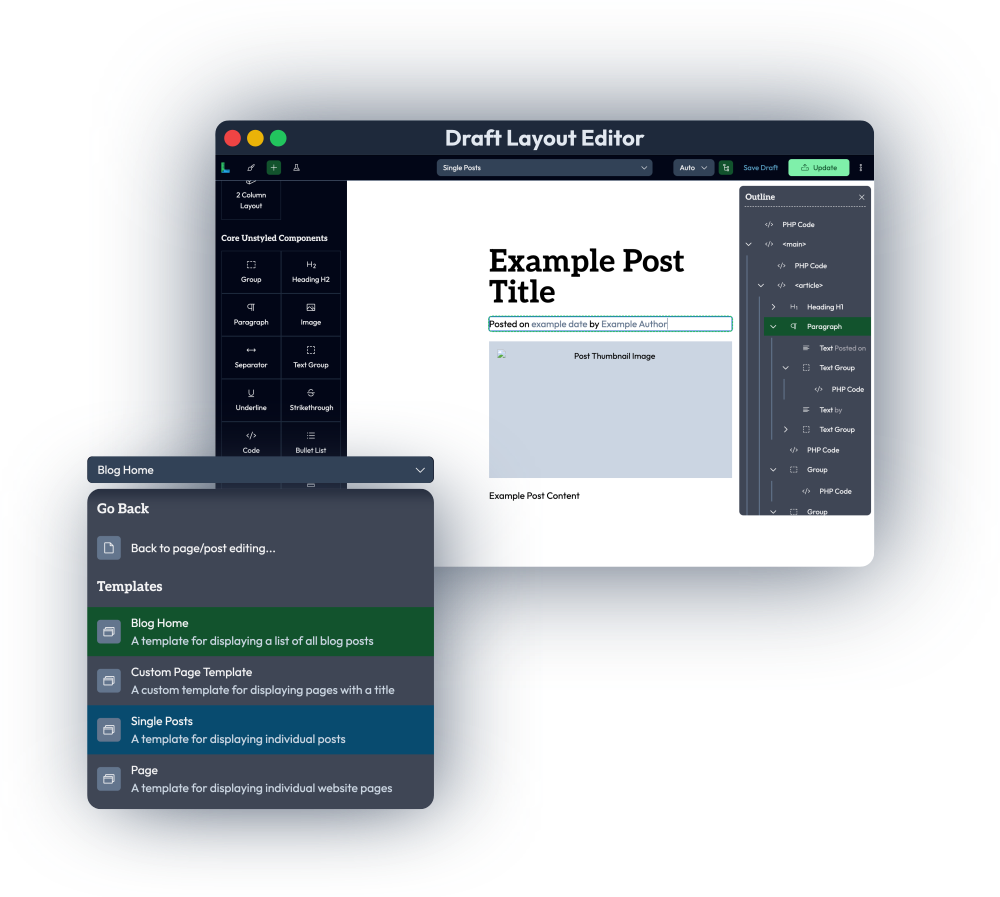
Absolutely. Assuming the WordPress theme is set up correctly, you can edit common/global components like headers, navigation menus, sidebars, and footers inside the Visual Editor. For any template file defined in your theme (e.g., single.php for individual blog posts, page.php for individual pages, etc.), you can edit the styles and content (HTML/CSS), though PHP code isn't editable at the moment.
Are WordPress shortcodes supported in your Visual Editor?
Yes, any registered shortcodes (from WordPress plugins and themes) can be used inside the Visual Editor simply by typing out the code as text. Shortcodes with nested content/children work too. In fact, you can even put drag-and-drop visually editable elements as nested content inside a shortcode.
Does your Editor support reusing blocks or components?
Yup! You can put any HTML code and Tailwind classes in a file inside your WordPress theme and then add it to any page/post from the Visual Editor with a single click. Global reusable components (where changing the original file will update that component everywhere it's used) are also supported. You can pass props, attributes, or custom data to these components to render different versions as well.
What's the difference between production and local sites?
A production website means any WordPress site that's live on a publicly accessible domain. Local or dev sites are ones you run locally on your computer for development (on http://localhost or similar) and that have the WP_DEBUG environment variable set to true. With Draft Layout, you can have unlimited local sites for development. It's only when you go live in production that they will count in your license. If you need significantly more production sites than the standard plans allow, get in touch with us.
How reliable is Draft Layout?
One of our core goals and vision with Draft Layout is to utilize robust open-source standards and infrastructure (PHP, WordPress, Tailwind) as much as possible and keep vendor-specific logic/formats and proprietary "magic" to a minimum. So when you save a page/post, the HTML/CSS is pre-rendered and stored in the database. This means that when a user visits your site, the page rendering logic is not dependent on Draft Layout. In fact, even if you deactivate or completely delete our plugin, your site will still continue to render and work correctly! Unlike most other WP editors, we don't lock you in. The code you write is based on open, interoperable standards (HTML, PHP, Tailwind), and you fully own your code and are free to do whatever you want with it (like move to a different CMS or platform). For extra compatibility, we also have a tool that can automatically convert most of your Tailwind HTML code into a format that's visually editable inside WP's built-in Block or Gutenberg editor. So as a backup option, it's also possible to migrate your site and manage/edit it in Gutenberg instead of Draft Layout if you want.
What Tailwind classes and variants are supported?
In your code, you can use literally any Tailwind class, and it'll render correctly in the front-end; this is because we use the actual and official Tailwind library to generate the CSS and styles. Inside the Visual Editor, most of the common Tailwind classes are editable with UI/dropdown fields as well. When it comes to variants, the hover: and breakpoint variants (md:, lg:, xl:, etc., including custom ones) are editable visually, provided that only one variant is used per class. Multiple variants stacked up (like .lg:hover:text-xl) will still render properly, but aren't visually editable.
Does Draft Layout integrate with other plugins?
Our plugin pre-renders all the HTML/CSS code and saves it to the WordPress database (as post_content in the wp_posts table). This means that most third-party plugins (for site speed, optimization, SEO, etc.) work very well with Draft Layout. We utilize standard PHP and WordPress capabilities and systems as much as possible, while keeping vendor-specific proprietary "magic" to a minimum. So when someone visits a page on your site, there's no pre-processing or rendering overhead from our plugin. In fact, our plugin does nothing while WordPress simply serves up the HTML stored in the database directly.
Is there a free trial available?
Due to the nature of this product (a downloadable WordPress plugin), free trials aren't available at the moment. However, we have a generous 100-day refund policy, so you can try it risk-free knowing that if (in the worst-case scenario) you don't like it, you can get your full money back, no problem at all.